

Layers and sprites
The graphics modes put one grid of tiles on the screen. The card can draw two, one in front of the other, and 64 sprites that go anywhere on top of them — which is most of what a game's screen is made of.
Two layers
Layer 0 is the one text mode uses and the one the last chapter drew on. Layer 1 is a second, complete set of the same things: its own name, pattern and attribute tables, its own bits per pixel and palette row, its own scroll. Registers $10–$16 are layer 0's and $18–$1E are the same again for layer 1, so VC_REG_L1CTRL is L0CTRL's twin.
Layer 1 starts switched off. VdpLayer turns a layer on or off without touching its other settings:
  ldx #1                        ; layer 1
  lda #1                        ; anything but 0: show it
  jsr VdpLayer
Wherever a layer 1 pixel is transparent — value 0, in a layer not set to draw it — layer 0 shows through. So layer 1 is the place for anything that sits in front of the scenery: a score, a frame, a line of text, the leaves in front of the path.
What's in front of what
Seven levels, from the back:
| Level | What |
|---|---|
| 0 | The backdrop — the COLOR register's low nibble |
| 1 | Layer 0 |
| 2 | Sprites |
| 3 | Layer 1 |
| 4 | Layer 0 cells with the priority bit set |
| 5 | Sprites with the priority bit set |
| 6 | Layer 1 cells with the priority bit set |
With no priority bits anywhere, that is backdrop, layer 0, sprites, layer 1: sprites walk in front of the scenery and behind whatever is on layer 1. A cell with its attribute's priority bit set jumps in front of ordinary sprites, which is how a character walks behind a tree; a sprite with its priority bit set jumps in front of layer 1, which is how a cursor stays on top of everything. Only a layer with attribute bytes, at 2 bits per pixel or more, has priority bits to set.
Scrolling
VdpSetScroll moves a layer's picture by a number of pixels. The layer wraps around: whatever scrolls off the left comes back on the right.
  lda #0
  sta VDP_P0                    ; bit 8 of the X scroll
  lda ScrollX                   ; bits 7-0
  ldy ScrollY
  ldx #0                        ; layer 0
  jsr VdpSetScroll
Bigger numbers move the picture left and up. Each layout wraps where its map ends — at 256 pixels across in Compact and Graphics, 240 down in Graphics and Full — and Full is 320 pixels wide, which is more than a byte can count, so it takes the ninth bit in VDP_P0. Scrolling costs the 65C02 nothing but the call, and it moves by the pixel in every layout, text included.
The map is only ever the size of the screen. To travel through a world bigger than that, write the next column of tiles into the cells about to come into view just before they do — a column is 30 bytes, which fits easily between two pictures.
Sprites
A sprite is a small picture the card draws at any position, over or under the layers, without disturbing them. There are 64, and each one is four bytes in a sprite table in the card's memory:
| Byte | Holds |
|---|---|
| 0 | Y — the top edge. 241–255 are just above the screen, for sliding in from the top |
| 1 | X, bits 7–0 — the left edge |
| 2 | Which shape, from the sprite pattern table |
| 3 | Attributes: palette row in bits 3–0, flips in 4 and 5, priority in 6, and X's ninth bit in 7 |
X runs to 383, and 384–511 count as −128 to −1, so a sprite can enter from the left. VdpSprite writes all four bytes of one sprite: the sprite's number in X and the four values in VDP_P0–VDP_P3. It expects the table at $2000 (SPRATTR = $40); a program that puts it elsewhere writes the bytes itself.
The rest is set by register:
| Register | Sets |
|---|---|
SPRCTRL | Sprites on (VC_SPRCTRL_ENABLE), bits per pixel, collision checking |
SPRCOUNT | How many of the 64 slots to draw |
SPRPAT | Where the shapes are |
MODE1 | 8 × 8 or 16 × 16 (VC_MODE1_SPRSIZE), and doubled in size (VC_MODE1_SPRMAG) |
SPRLIMIT | How many can share a line — 16 unless you say otherwise, up to 32 |
A sprite shape is a tile, one row at a time, at the bits per pixel SPRCTRL chooses, and value 0 is always transparent. Where two sprites overlap, the one with the lower number is in front.
A layer, a layer, and four sprites
; Two layers and four sprites, in Full mode: 40 × 30 cells of 8 × 8, the whole
; 320 × 240 picture with no border.
;
; Layer 0 is a sea of 4-bit waves. Layer 1 is text in the card's own character
; set, in front of it, with everything but the letters see-through. Four
; sprites sit on top. Press a key and the sea scrolls sideways a pixel a frame
; while the text stays put and the sprites cross at four speeds; press another
; to go back to text.

.setcpu "65C02"

.include "6502-VDP.inc"

.segment "CODE"

BasicStartup:
  .byte $0A, $08, $0A, $00, $A5, $32, $30, $36, $30, $00, $00, $00

COLS          = 40              ; Full mode
ROWS          = 30
WIDTH         = 320             ; the picture, and the layer's map, in pixels

L0_NAMES      = $0000           ; 1,200 bytes each, so 2 KB apart
L1_NAMES      = $0800
L0_PATTERNS   = $1000
L1_PATTERNS   = $1800           ; the character set goes here
SPRITE_TABLE  = $2000           ; where VdpSprite expects it
SPRITE_SHAPES = $2800

SEA_ROW       = 10              ; palette row 10: blues
SPRITES       = 4

Index    := $40                ; which sprite the loop is on
ScrollLo := $41                ; layer 0's scroll, nine bits
ScrollHi := $42

Start:
  jsr KernalVersion             ; A = major version
  cmp #2
  bcc NoCard
  jsr VdpInfo                   ; carry set: no 6502-PICOVDP
  bcc Setup
NoCard:
  lda #<NeedsCard
  ldy #>NeedsCard
  jmp PrintStr

Setup:
  lda #0
  ldx #VC_REG_MODE1             ; display off while the tables go in
  jsr VdpWriteReg
  lda #VC_VMODE_FULL
  jsr VdpSetMode

  ldy #0
@register:
  lda Registers+1,y
  ldx Registers,y
  jsr VdpWriteReg               ; keeps Y
  iny
  iny
  cpy #RegistersEnd - Registers
  bne @register

; Layer 1's patterns are the card's character set, copied in by the card at
; the next vertical blank. Two blanks, and it has certainly landed.
  lda #VC_FONT_LAYER1 | VC_FONT_CP437
  ldx #VC_REG_FONT
  jsr VdpWriteReg
  jsr WaitVBlank
  jsr WaitVBlank

; Layer 0: one wave tile, in every cell.
  lda #<L0_PATTERNS
  ldx #>L0_PATTERNS
  jsr PointAt
  ldx #0
@wave:
  lda Wave,x
  sta VC_DATA
  inx
  cpx #32
  bne @wave

  lda #<L0_NAMES
  ldx #>L0_NAMES
  jsr PointAt
  lda #0                        ; tile 0
  jsr FillNames

; Layer 1: spaces everywhere, which draw nothing, and one line of text.
  lda #<L1_NAMES
  ldx #>L1_NAMES
  jsr PointAt
  lda #' '
  jsr FillNames
  lda #<(L1_NAMES + 3 * COLS + 11)
  ldx #>(L1_NAMES + 3 * COLS + 11)
  jsr PointAt
  ldx #0
@title:
  lda Title,x
  beq @hint
  sta VC_DATA
  inx
  bra @title
@hint:
  lda #<(L1_NAMES + 26 * COLS + 7)
  ldx #>(L1_NAMES + 26 * COLS + 7)
  jsr PointAt
  ldx #0
@hintChar:
  lda Hint,x
  beq @shape
  sta VC_DATA
  inx
  bra @hintChar

; The sprites' one shape: 4 bits a pixel, 0 see-through.
@shape:
  lda #<SPRITE_SHAPES
  ldx #>SPRITE_SHAPES
  jsr PointAt
  ldx #0
@ball:
  lda Ball,x
  sta VC_DATA
  inx
  cpx #32
  bne @ball

  jsr PlaceSprites              ; where they start

  lda #VC_MODE1_DISP | VC_MODE1_SPRMAG
  ldx #VC_REG_MODE1             ; display on, every sprite drawn twice the size
  jsr VdpWriteReg

  jsr WaitKey                   ; hold still until a key

; -----------------------------------------------------------------------------
; A frame at a time until another key is pressed.
; -----------------------------------------------------------------------------
Frame:
  jsr WaitVBlank                ; change things between pictures, not during one

  inc ScrollLo                  ; the sea moves left a pixel ...
  bne @scrolled
  inc ScrollHi
@scrolled:
  lda ScrollHi                  ; ... and wraps at 320
  beq @setScroll
  lda ScrollLo
  cmp #<WIDTH
  bcc @setScroll
  stz ScrollLo
  stz ScrollHi
@setScroll:
  lda ScrollHi
  sta VDP_P0                    ; bit 8 of the scroll
  lda ScrollLo
  ldy #0
  ldx #0                        ; layer 0
  jsr VdpSetScroll

  ldx #0
@move:
  lda SpriteXLo,x               ; move each one right by its own speed
  clc
  adc Speed,x
  sta SpriteXLo,x
  lda SpriteXHi,x
  adc #0
  and #1                        ; X is nine bits
  sta SpriteXHi,x
  beq @moved
  lda SpriteXLo,x               ; 320-495 is off the right-hand edge:
  cmp #<WIDTH                   ;   jump to 496, which is -16, so it
  bcc @moved                    ;   comes back in from the left
  cmp #$F0
  bcs @moved
  lda #$F0
  sta SpriteXLo,x
@moved:
  inx
  cpx #SPRITES
  bne @move
  jsr PlaceSprites

  jsr BufferSize
  beq Frame
  jsr ReadBuffer
  jsr InitVideo                 ; text mode, sprites and layer 1 off
  jmp VideoClear

; Write all four sprites' attributes from the tables below.
PlaceSprites:
  stz Index
@sprite:
  ldx Index
  lda SpriteY,x
  sta VDP_P0                    ; Y
  lda SpriteXLo,x
  sta VDP_P1                    ; X, bits 7-0
  stz VDP_P2                    ; shape 0
  lda SpriteXHi,x
  lsr a                         ; X bit 8 into the attribute's top bit
  lda #0
  ror a
  ora SpriteRow,x               ; and the palette row it draws in
  sta VDP_P3
  jsr VdpSprite                 ; X = which sprite
  inc Index
  lda Index
  cmp #SPRITES
  bne @sprite
  rts

; Wait for a key without printing it.
WaitKey:
  jsr BufferSize
  beq WaitKey
  jmp ReadBuffer

; Point port A at a card address below $4000, for writing. A = low, X = high.
PointAt:
  sta VC_REG
  txa
  ora #VC_ADDR_WRITE
  sta VC_REG
  rts

; Write A into all 1,200 cells of a name table, from where port A points.
FillNames:
  ldy #ROWS
@row:
  ldx #COLS
@cell:
  sta VC_DATA
  dex
  bne @cell
  dey
  bne @row
  rts

Registers:
  .byte VC_REG_L0NAME,   L0_NAMES >> 10
  .byte VC_REG_L0PAT,    L0_PATTERNS >> 11
  .byte VC_REG_L0CTRL,   VC_LCTRL_4BPP | VC_LCTRL_ATTR_NONE | VC_LCTRL_ENABLE | VC_LCTRL_OPAQUE
  .byte VC_REG_L0PAL,    SEA_ROW        ; with no attributes, the whole layer's row
  .byte VC_REG_L0SCRX,   0
  .byte VC_REG_L0SCRY,   0
  .byte VC_REG_L1NAME,   L1_NAMES >> 10
  .byte VC_REG_L1PAT,    L1_PATTERNS >> 11
  .byte VC_REG_L1CTRL,   VC_LCTRL_1BPP | VC_LCTRL_ATTR_NONE | VC_LCTRL_ENABLE
  .byte VC_REG_L1PAL,    0
  .byte VC_REG_L1SCRX,   0
  .byte VC_REG_L1SCRY,   0
  .byte VC_REG_COLOR,    (TMS_WHITE << 4) | TMS_TRANSPARENT  ; layer 1: white on nothing
  .byte VC_REG_SPRATTR,  SPRITE_TABLE >> 7
  .byte VC_REG_SPRPAT,   SPRITE_SHAPES >> 11
  .byte VC_REG_SPRCOUNT, SPRITES
  .byte VC_REG_SPRCTRL,  VC_SPRCTRL_ENABLE | VC_SPRCTRL_4BPP
RegistersEnd:

; Each nibble is one pixel: a shade from palette row 10, dark to light.
Wave:
  .byte $22, $22, $22, $22
  .byte $62, $22, $22, $26
  .byte $96, $22, $22, $69
  .byte $B9, $62, $26, $9B
  .byte $3B, $96, $69, $B3
  .byte $33, $B9, $9B, $33
  .byte $33, $3B, $B3, $33
  .byte $33, $33, $33, $33

; A shaded ball, lit from the top left.
Ball:
  .byte $00, $77, $77, $00
  .byte $07, $9F, $77, $70
  .byte $79, $FF, $77, $77
  .byte $77, $97, $77, $75
  .byte $77, $77, $77, $55
  .byte $77, $77, $75, $53
  .byte $07, $75, $55, $30
  .byte $00, $55, $33, $00

SpriteY:   .byte 64, 108, 152, 196
SpriteRow: .byte 2, 4, 6, 12        ; red, yellow, green, magenta
Speed:     .byte 1, 2, 3, 4
SpriteXLo: .byte 0, 60, 120, 180
SpriteXHi: .byte 0, 0, 0, 0

Title:     .byte "LAYERS AND SPRITES", 0
Hint:      .byte "PRESS A KEY TO SET THEM MOVING", 0
NeedsCard: .byte "NEEDS BIOS 2 AND A 6502-PICOVDP", CHAR_CR, CHAR_LF, $00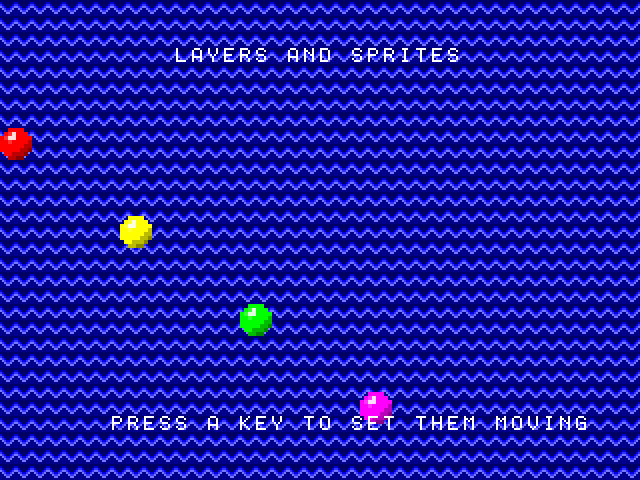
Four things in there are worth pulling out.
Layer 1's letters come from the card. Writing FONT with VC_FONT_LAYER1 has the card copy its own character set into layer 1's pattern table, at the next vertical blank — so the program waits for one before it carries on. A name table of character codes is then a line of text, in any layout.
Transparent means color 0. Layer 1 has no attribute bytes, so its colors come from the COLOR register: letters in the high nibble, the rest in the low one. That low nibble has to be 0, TMS_TRANSPARENT, for the sea to show between the letters. Set it to black instead and layer 1 is a black sheet with white letters on it, hiding the sea and the sprites behind it.
Everything moves between pictures. Each time through, WaitVBlank comes first, then the scroll and the four sprites. That is all the time there is in Full mode — a little over 1,400 cycles — and it is plenty for a register write and sixteen bytes.
Sprites wrap by hand. X is nine bits, and past the right-hand edge the program jumps a sprite to −16, so that it slides back in from the left rather than appearing all at once.
When sprites collide
Whenever two sprites' visible pixels touch, the card sets a flag, and it stays set until a program reads it. VdpStatus with X = 0 reads status register 0 and clears it:
  ldx #0
  jsr VdpStatus                 ; A = STAT0, and the flags clear
  and #VC_STAT0_COL
  bne Crashed
The flag says that two sprites touched, not which. Setting VC_SPRCTRL_DETAIL as well has the card keep a note of every sprite involved, in status registers 8 to 15, one bit per sprite — read those before status register 0, which clears them too. VC_STAT0_OVF is the other flag here: more sprites wanted a line than SPRLIMIT allows, and some were left off it.
The same two events can interrupt instead, along with the end of every picture and a chosen screen line — Interrupts has a handler.
Next: making a noise.