

Reaching the machine
BASIC is a program running on a 65C02, and it doesn't hide the fact. Six keywords let you reach past it.
Looking at memory
PEEK(address) reads one byte, 0 to 255. POKE address, value writes one:
POKE 2560, 42
PRINT PEEK(2560)
42
OKAddresses run from 0 to 65535. That's the whole map — RAM, the ROM that BASIC itself lives in, and the hardware.
Poking at random
Some of that memory is BASIC's own working space, and writing to it will stop the machine mid-sentence. It can't damage anything: press reset, or switch off and on, and you're back. But whatever you'd typed is gone, so SAVE first.
Finding out what's fitted
At switch-on the machine looks for every card it knows about and records what it found in one byte, at address 781. Each bit is one card:
| Bit | Value | Card |
|---|---|---|
| 7 | 128 | video |
| 6 | 64 | sound |
| 5 | 32 | keyboard and joysticks |
| 4 | 16 | serial |
| 3 | 8 | storage |
| 2 | 4 | clock |
| 1 | 2 | banked RAM, upper half |
| 0 | 1 | banked RAM, lower half |
10 H = PEEK(781)
20 PRINT "THIS ACE HAS"
30 PRINT
40 IF H AND 128 THEN PRINT "VIDEO"
50 IF H AND 64 THEN PRINT "SOUND"
60 IF H AND 32 THEN PRINT "KEYBOARD AND JOYSTICKS"
70 IF H AND 16 THEN PRINT "SERIAL"
80 IF H AND 8 THEN PRINT "STORAGE"
90 IF H AND 4 THEN PRINT "CLOCK"
100 IF H AND 3 THEN PRINT "BANKED RAM"
110 PRINT
120 PRINT "FREE MEMORY"; FRE(0)On an ACE, that program prints everything on the list — an ACE has the lot. It earns its keep on a machine you built yourself, and as the polite way for a program to check before it uses something:
10 IF (PEEK(781) AND 64) = 0 THEN PRINT "NO SOUND CARD - PLAYING QUIETLY"MEM prints the same byte in hex, along with the free memory and the current disk, which is quicker to type when you just want a look:
MEM 30718 BYTES FREE HW=$FF
DISK 0
OKHow much room is left
FRE(0) gives you the bytes available for variables, arrays and strings:
PRINT FRE(0) 30718
OKThat's a freshly-started machine. Every program line, variable and array comes out of it. The argument to FRE is ignored — FRE(0) is just how it's written.
The extra RAM
Above the ordinary memory there's a window at address 32768 backed by banked RAM, and BANK n chooses which bank shows through it:
BANK 1
POKE 32768, 42
BANK 0
PRINT PEEK(32768)
BANK 1
PRINT PEEK(32768) 0
 42

OKSame address, different bank, different byte. It's how you keep more data than fits in one go — a map, a screen, a level — and swap between them.
Calling machine code
SYS address calls machine code and comes back when it returns:
POKE 2560, 96
SYS 2560
96 is the byte for RTS, "return from subroutine", so that program calls one instruction that does nothing but come straight back. It's not useful; it's the smallest possible demonstration that the door is there.
SYS can hand the routine something to work on, too. Up to three more numbers after the address go into the processor's three registers, A, X and Y, in that order — and whatever the routine leaves in them when it returns is kept, for PEEK to read:
| Register | Going in | Coming back |
|---|---|---|
| A | SYS address, a | PEEK(787) |
| X | SYS address, a, x | PEEK(788) |
| Y | SYS address, a, x, y | PEEK(789) |
| The flags | — | PEEK(784) |
That's enough to call the machine's own routines straight from BASIC. The Kernal at address 40960 prints the character whose code is in A, and the one at 41083 answers with the ROM's version, major number in A and minor in X:
10 REM CALL THE KERNAL FROM BASIC
20 FOR C = 65 TO 69
30 SYS 40960, C
40 NEXT C
50 PRINT
60 SYS 41083
70 PRINT "MAJOR VERSION"; PEEK(787)
80 PRINT "MINOR VERSION"; PEEK(788)
RUN
ABCDE
MAJOR VERSION 2
MINOR VERSION 0
OKMostly, though, what's on the other side of the door is machine code you wrote yourself, and SYS is how BASIC hands over to it.
When machine code stops
The 65C02 has an instruction for stopping on purpose: BRK, byte 0. When a program reaches one, the machine stops it there and tells you where it was and what was in the registers, then gives you the prompt back with your program still in memory.
This program pokes seven bytes of machine code into memory and calls them. They load 42 into A and 3 into X, then hit a BRK:
10 REM A BREAKPOINT IN MACHINE CODE
20 FOR I = 0 TO 6
30 READ B: POKE 2560 + I, B
40 NEXT I
50 SYS 2560
60 PRINT "BACK IN BASIC"
70 DATA 169, 42, 162, 3, 0, 7, 96
RUN
BREAK $07 AT $0A04
A=2A X=03 Y=00 P=30 S=FB
OKThe first line says where: the BRK is at $0A04, which is 2564 — the fifth of the seven bytes. The $07 is the byte straight after the BRK, which the processor skips over and which a program can use to number its breakpoints. The second line is the registers, in hexadecimal: 2A is the 42 in A, X holds the 3, P is the processor's flags and S is where its stack had got to.
Line 60 never runs. A BRK isn't a way back into BASIC; it's a stop, and CONT won't pick the program up again afterwards. What it's for is finding out how far your machine code got — put one where you think the trouble is, and the registers tell you what the code was holding when it arrived.
The same registers are kept at 787, 788 and 789 for A, X and Y, 784 for the flags and 790 for the stack, so a program can read them as well.
Wozmon
There's one more program in the ROM, and it's older than all of this: Wozmon, the monitor Steve Wozniak wrote for the Apple I in 1976, 250 bytes long. It lives at the very top of memory, at 65280:
SYS 65280\The backslash is its prompt. Wozmon speaks in hexadecimal and nothing else. Type an address and it shows you the byte there; type two addresses with a dot between them and it shows you everything in between:
FF00.FF07FF00: A9 1B C9 08 F0 18 C9 1BThose are the first eight bytes of Wozmon itself. An address, a colon and some bytes puts them into memory, and an address followed by R runs the code there — which is how you get back: C000R starts BASIC again, with your program still in memory.
C000R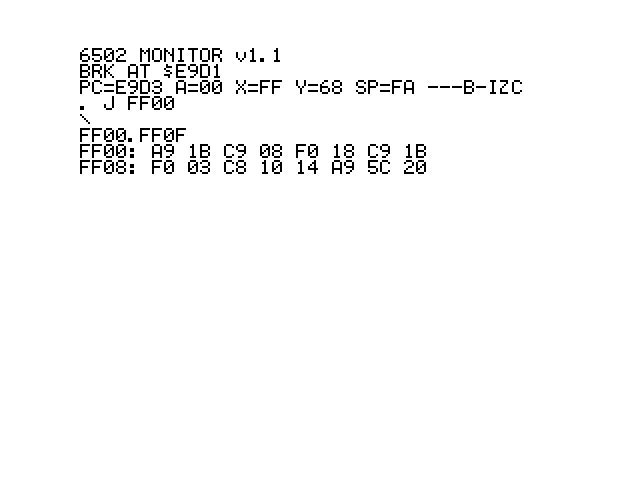
It's a lovely thing to have, and it's genuinely useful for a quick look at memory. Onto real hardware uses it to paste machine code in over the serial cable.