

The keyboard
Sixty-seven mechanical keys across the front of the board. Most of it is exactly what you'd expect — letters type letters, Enter sends the line. This chapter is the rest.
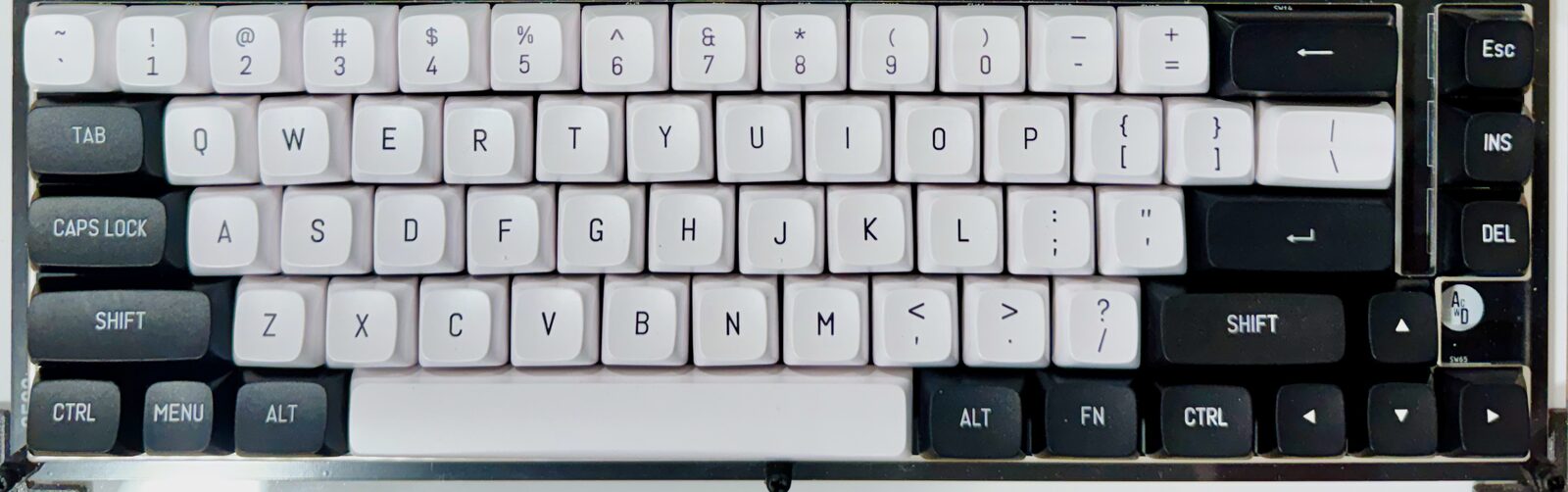
Everything is in capitals
The ACE types in upper case, period. There is no lower case from the keyboard — hold Shift and you get the symbol on a number key, but a letter is a capital either way. Caps Lock has a real switch under it like every other key, but the controller sends nothing when you press it — there is no case for it to lock.
This suits BASIC, which wants its keywords in capitals anyway. Text in quotes is stored exactly as you type it, so PRINT "HELLO" prints HELLO — and there's no way to type Hello at the machine itself.
Lower case does exist
The character set has lower-case letters in it, and anything arriving over the serial port can be mixed case, so a listing pasted in from a laptop keeps whatever case it was written in. The keyboard is the limit here, not BASIC.
Stopping things
| Key | What it does |
|---|---|
| Esc | Stops a running program. This is the one to remember. |
| Ctrl+C | The same thing, for people used to typing it |
| Reset button | Restarts the machine — see below |
Esc is checked between every statement while a program runs, so it works even from inside a tight loop. What you get back is:
BREAK IN 30

OK
— the line number it happened to be on. Nothing is lost. LIST still shows your program, and CONT starts it up again from where it stopped.
At the OK prompt, with nothing running, Esc does nothing. That's deliberate: it means you can't accidentally break something while you're just typing a line in.
It's worth pressing once before you need it. The machine below already has a program in it that never stops on its own — a GOTO sending BASIC back to the same line for ever. Click it, type RUN, let HELLO fill the screen, and then press Esc.
Nothing to press these keys on
These 67 keys exist on the screen as well. Every machine on this site draws the board's keyboard when the device reading it hasn't got one, so the machine above is typed at with a finger on a phone — and on a laptop the same button is the quickest way to find Fn or Ins when the keyboard in front of you has neither.
Editing a line
There's no full-screen editor here. To change line 30, type line 30 again — the new version replaces the old one. To delete it, type 30 on its own and press Enter.
Backspace rubs out the last character while you're still typing a line, before you press Enter.
The reset button
It sits just above Esc, in the top-left corner of the keyboard, where you can find it without looking.
Pressing it starts BASIC again from the top — but it doesn't wipe your program. You get the header and the OK prompt back, and the program is still there:
LIST
10 PRINT "STILL HERE"

OK
Its variables are cleared, the way RUN clears them, so a program picks up from the beginning rather than from where it was. This is the button for getting out of anything — a program stuck in machine code, a machine that has stopped answering.
For a genuinely clean start, switch the power off and on again. That clears memory properly and BASIC comes up from scratch, banner and all.
Neither one saves anything for you. If it matters, SAVE it first — see Storage.
Ctrl, and the keys nothing listens for
Holding Ctrl sends a control code instead of a letter: Ctrl+A through Ctrl+Z send codes 1 to 26, and Ctrl+[ sends the same code as Esc. Two of them do something at the prompt today — Ctrl+C breaks, and Ctrl+H is backspace. The rest arrive at your program as ordinary characters, for you to do what you like with.
The arrow keys, Ins and Del each send a code too. BASIC doesn't act on them — there's no cursor movement at the OK prompt — but a program reading the keyboard directly can use them, and that's how you'd build a menu or a game that reads the arrows.
Caps Lock, Menu, Alt and Fn go one step further and send nothing at all. The controller sees the press and passes no character on, so as far as anything typing is concerned they aren't there.
That's the firmware's choice, though, not the board's. All 67 switches are wired into one 8 × 8 grid, and a program in assembly can ask the controller to let go of that grid for a moment and read it itself. Do that and Caps Lock and Alt are simply two more buttons — and you can ask whether a key is held rather than waiting for it to be typed. The keyboard matrix is the grid; the keyboard and the sticks is the code.
What PRINT CHR$() can and can't do
PRINT CHR$(13) gives you a new line, and CHR$(7) rings the bell. Beyond those, the screen ignores what it's sent: control codes it doesn't recognize are dropped, and so is anything above character 126 — so PRINT CHR$(219) puts nothing on the screen, even though there is a solid block at that position in the character set. Reaching the upper half of the character set means going through the Kernal's raw output routine from assembly.
The character set shows all 256 of them, and which ones PRINT will pass.
📄 Keyboard Layout card — the keys as they sit on the board, and the ones worth remembering. The Keyboard Matrix card has the grid behind them, for anyone wiring their own.