

COB — Computer On a Backplane
The COB runs BIOS 1.6
The COB's video cards are the TMS9918A and its Pico9918 stand-in. It runs BIOS 1.6, not the BIOS 2.0 this guide describes, so its programming reference — the Monitor, the TMS9918A's screen modes, the BIOS it boots — is the BIOS 1.6 edition of this guide. The rest of this page is about the machine itself, and holds either way.
The first machine in the family, and still the best one to build if you want to see how a 6502 computer works.
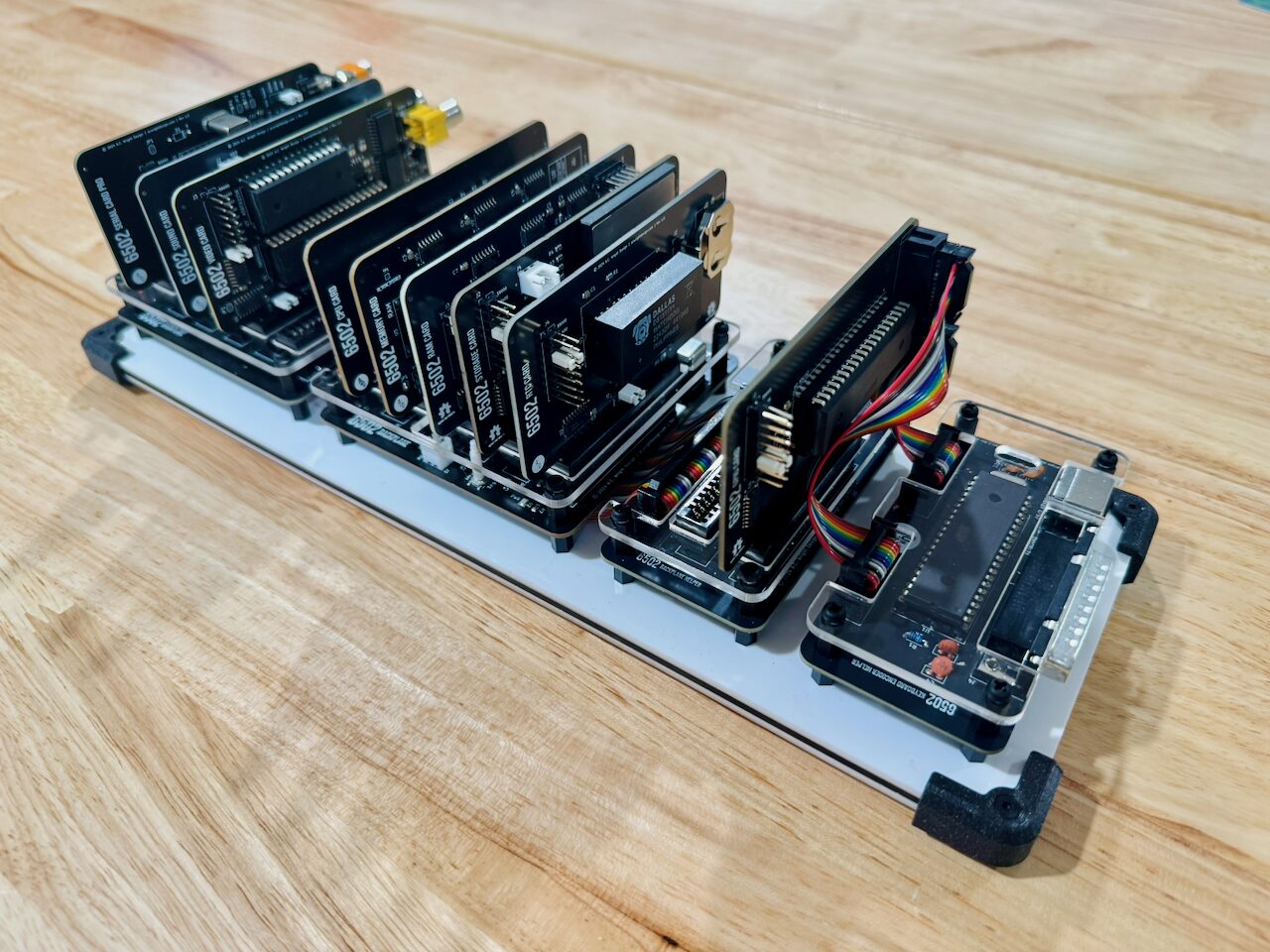
There is no motherboard here. A passive backplane carries the bus across five slots and nothing else; every function is a card you choose to fit. Want video? Fit the VGA card. Don't need sound? Leave the slot empty. The machine boots either way — the BIOS looks around at startup, notes what it found, and does without whatever isn't there.
Five slots not enough? A Backplane Helper chains another backplane onto the first, and you can keep chaining. Nothing in the design caps it — the limit is how far the bus will carry before the signals give up.
Building it one card at a time is how the whole architecture got proved, and it's why the rest of the family works the way it does. If you're laying out your own 6502 board, this is the reference design to read.
The backplanes
- Backplane — Passive, 5 slots, full bus interconnect
- Backplane Pro — 5 slots plus integrated clock, reset and power distribution. Rev 1.1 is all through-hole and adds a power switch and DC barrel jack.
- Backplane Helper — Chains one backplane to the next, adding its slots to the same bus
Power comes in on a DC barrel jack; the Backplane Pro Rev 1.1 adds an on-board power switch and moves to all through-hole parts, which makes it a much friendlier first build.
The card catalog
| Card | What it adds |
|---|---|
| CPU Card | CPU — Hosts the 65C02 in card form |
| CPU Card Pro | CPU — 65816 16-bit CPU, backward-compatible with the 65C02 |
| Memory Card | Memory — 32 KB SRAM + 32 KB EEPROM with address decoding |
| RAM Card | Banked RAM — 512 KB as two 256 KB banks, 256 × 1 KB windows each |
| RTC Card | RTC — DS1511Y with battery backup and 256 bytes of NVRAM |
| Storage Card | Storage — CompactFlash over IDE |
| Storage Card Pro | Storage — SD card + 16 MB SPI flash |
| Serial Card | Serial — RS-232 via R6551AP ACIA + MAX232 |
| Serial Card Pro | Serial — Adds full modem control (DTR, DCD, DSR) |
| GPIO Card | GPIO — 65C22 VIA for keyboards, joysticks, timers |
| Sound Card | Audio — 3-voice SID via ARMSID, RCA line-level out |
| VGA Card | Video — VGA 640×480 via Pico9918 |
| VGA Card Pro | Video — Fully programmable VGA via Pi Pico |
| Video Card | Video — Composite video via a real TMS9918A with 16 KB VRAM |
| Video Card Pro | Video — Enhanced composite video |
| LCD Card | Display — 16×2 character LCD via 65C22 VIA, 4- or 8-bit mode |
| Blinkenlights Card | Diagnostics — LEDs on the 16 address, 8 data and 8 control lines, live |
| Prototype Card | Prototyping — Breadboard area with full bus access |
Several come in a Pro variant, which is generally the later, better-behaved revision. The Blinkenlights Card does nothing useful and is worth fitting anyway.
A minimum machine
CPU Card, Memory Card, and either a VGA Card or a Serial Card so there's somewhere to put the prompt. That's a working computer with BASIC on it. Everything else is an upgrade.
Where to get it
Schematics, board files, bills of materials and the keyboard controller firmware are all in the 6502-COB repository. The printable reference sheet is here.
The COB's cards are also what you'd use to build a standalone KIM.
📄 6502-COB card — the machine on two printable pages. The card index has the rest.