

Graphics
The text screen is one of four pictures the video card can draw. The other three are grids of little square tiles, with sprites that move over them, and BASIC reaches every one. SCREEN picks the picture. Almost everything after that is putting numbers into the card's own memory with VPOKE: which tile goes where, what each tile looks like, and which colors it's painted in.
Four screens
| Grid | Each cell | ||
|---|---|---|---|
SCREEN 0 | 40 × 24 | A character | The text screen |
SCREEN 1 | 32 × 24 | An 8 × 8 tile | With a border all around |
SCREEN 2 | 32 × 30 | An 8 × 8 tile | Top to bottom, a border left and right |
SCREEN 3 | 40 × 30 | An 8 × 8 tile | The whole screen, no border |
SCREEN 2 is the one to start with. SCREEN 3 is the same with the borders taken away, and ten more tiles in every row to fill.
SCREEN 1, 2 or 3 wipes the grid, so every cell holds tile 0, and moves all 64 sprites to just below the bottom of the picture, where nobody can see them. It doesn't draw any tiles or sprites. That part is yours.
Back to text when it stops
When a program stops — at END, at an error, when you press Esc, or by running off its last line — BASIC puts the text screen back and clears it before it prints anything. So a picture lasts exactly as long as the program that draws it, and a program that draws something and ends shows it for no time at all.
To keep a picture on the screen, keep the program running:
90 IF INKEY = 0 THEN 90That line waits for a key, which is also how a player tells it they've seen enough.
SCREEN 0 goes back to text on purpose, part way through. It also puts back the sixteen text colors, whatever PALETTE did to them, and the border you last gave COLOR.
The card's memory
The video card has 64 KB of memory of its own, separate from the 32 KB BASIC works in. PEEK and POKE can't see it; VPEEK and VPOKE can:
VPOKE address, value
PRINT VPEEK(address)
Addresses run from 0 to 65535. After SCREEN 1, 2 or 3, this is where things are:
| Address | What's there |
|---|---|
| 0 | Which tile is in each cell, a byte a cell, left to right and top to bottom |
| 2048 | Each cell's colors, a byte a cell, in the same order |
| 16384 | What the tiles look like, 32 bytes a tile |
| 49152 | What the sprites look like, 32 bytes a sprite shape |
| 64512 | The palette: the colors themselves |
So in SCREEN 2, VPOKE 32 * 5 + 10, 1 puts tile 1 in row 5, column 10. And VPOKE works on the text screen too, where address 0 is the top left character after a CLS.
Drawing a tile
A tile is 8 pixels across and 8 down, and each pixel is a number from 0 to 15. Two pixels fit in a byte, so a row is four bytes and a tile is 32. The first digit of a byte in hex is the left pixel and the second is the right one; in decimal, a byte is left * 16 + right.
So a row of eight pixels of color 3 is four bytes of 51, and this puts it along the top of tile 1:
FOR I = 32 TO 35 : VPOKE 16384 + I, 51 : NEXT ITile 0's bytes are at 16384 to 16415, tile 1's at 16416 to 16447, and so on: tile T starts at 16384 + 32 * T.
A pixel's number picks a color from a palette row: sixteen colors that the cell has to choose from. Which row a cell uses is its color byte, at 2048 and up. SCREEN sets every one to 0, and row 0 is the sixteen colors of the text screen, from the color chart. Put 2 in a cell's color byte and the same tile draws in reds instead.
The palette: PALETTE
The card has 256 colors to draw with, in sixteen rows of sixteen. Every one of them can be changed:
PALETTE entry, red, green, blueentry is row * 16 + color, so entries 0 to 15 are row 0. Red, green and blue are each 0 to 15. PALETTE 15, 15, 15, 0 turns color 15, white, into yellow, and everything already drawn in color 15 turns yellow with it — the card looks the color up again every time it draws the screen.
The rows start out as:
| Row | Colors |
|---|---|
| 0 | The sixteen text colors |
| 1 | Grays, black to white |
| 2–13 | Twelve colors — red, orange, yellow, chartreuse, green, spring green, cyan, azure, blue, violet, magenta, rose — each dark at 0, pure at 7, nearly white at 15 |
| 14 | Browns |
| 15 | Blue-grays |
Sprites: SPRITE
A sprite is a small picture that goes anywhere, over the tiles and not stuck to their grid. There are 64 of them, numbered 0 to 63.
SPRITE number, x, y, shape, colors- x is 0 to 511 and y is 0 to 255: the sprite's top left corner, in pixels.
xfrom 384 up counts as off the left edge, 384 being 128 pixels off and 511 just one, so a sprite can slide in from the left. - shape is 0 to 255. A shape is drawn the same way as a tile, 32 bytes of pixels, and shape
Sstarts at49152 + 32 * S. - colors is the palette row, 0 to 15. Leave it off and it's 0. Add 16 to flip the sprite left to right, and 32 to flip it upside down.
In a sprite, color 0 is see-through: the tiles show around its edges. When two sprites overlap, the lower-numbered one is in front.
Sprites are 8 pixels square. VREG 1, 65 draws every one of them twice the size, and VREG 1, 64 puts them back. VREG writes one of the card's registers, the settings that decide how it draws, and register 1 holds a few switches at once: 64 keeps the picture on, and 1 doubles the sprites.
Scrolling: SCROLL
SCROLL layer, x, ymoves a whole picture of tiles by some pixels, without touching a byte of it. Bigger numbers move it left and up, and it wraps around: what goes off the left comes back on the right. x is 0 to 319 and y 0 to 255.
The layer is 0 for the tiles you've been drawing so far. There's a second.
A second layer: LAYER
Layer 1 is a whole second grid of tiles, in front of layer 0, and it starts hidden. Its tables are further up the card's memory:
| Address | Layer 1's |
|---|---|
| 4096 | Tile in each cell |
| 6144 | Colors of each cell |
| 32768 | What the tiles look like |
LAYER 1, 1 shows it and LAYER 1, 0 hides it again. In layer 1, color 0 is see-through, as it is in a sprite, so anything not drawn on layer 1 shows layer 0 behind it. That makes it the place for a score, a frame, or the branches in front of the path. Sprites go between the two layers.
Each layer has its own SCROLL, so layer 0 can move while layer 1 stays put.
Waiting for the picture: VSYNC
The card draws the screen sixty times a second, top to bottom. VSYNC waits until it has just finished one. That's the moment to move things: change a sprite or a scroll right after VSYNC and the change lands cleanly on the next picture, rather than halfway down this one.
It also sets the pace. A loop with one VSYNC in it goes around sixty times a second, on any machine, for as long as the rest of the loop is quick enough to fit.
Asking the card: VSTAT
VSTAT(n) reads one of the card's sixteen status registers. Two are worth knowing:
VSTAT(4)is 172 on the ACE's video card. It's how a program can check that the graphics are there before it uses them.VSTAT(0)has 32 added when two sprites have touched since the last time it was read — collision detection, done by the card. Test it withIF VSTAT(0) AND 32 THEN 500. Reading it clears it.
Loading from the memory card: VLOAD
Typing tiles in as DATA is fine for a few. For a whole set, draw them on your computer, put the bytes in a file on the memory card, and:
VLOAD "TILES.BIN", 16384copies the file into the card's memory, starting at that address, however long it is. A screen of tile numbers loads at 0 the same way, and a palette at 64512. ?LOAD ERROR means the file isn't on the current disk.
Sailing
10 REM SAILING - TILES, A SPRITE AND A SCROLL
20 SCREEN 2
30 FOR I = 0 TO 63 : READ B : VPOKE 16384 + I, B : NEXT I
40 FOR I = 0 TO 31 : READ B : VPOKE 49152 + I, B : NEXT I
50 FOR I = 0 TO 383 : VPOKE I, 1 : NEXT I
60 PALETTE 1, 0, 3, 8 : PALETTE 2, 2, 7, 13 : PALETTE 3, 9, 13, 15
70 VREG 1, 65
80 SPRITE 0, 120, 82, 0, 14
90 IF INKEY = 0 THEN 90
100 X = 0
110 VSYNC : X = X + 1 : IF X = 256 THEN X = 0
120 SCROLL 0, X, 0
130 IF INKEY = 0 THEN 110
200 DATA 17,17,17,17, 33,17,17,18, 50,17,17,35, 51,33,18,51
210 DATA 51,50,35,51, 51,51,51,51, 51,51,51,51, 51,51,51,51
220 DATA 51,51,51,51, 51,51,51,51, 51,51,51,51, 51,51,51,51
230 DATA 51,51,51,51, 51,51,51,51, 51,51,51,51, 51,51,51,51
300 DATA 0,0,15,0, 0,0,255,0, 0,15,255,0, 0,255,255,0
310 DATA 0,0,8,0, 119,119,119,119, 7,119,119,112, 0,119,119,0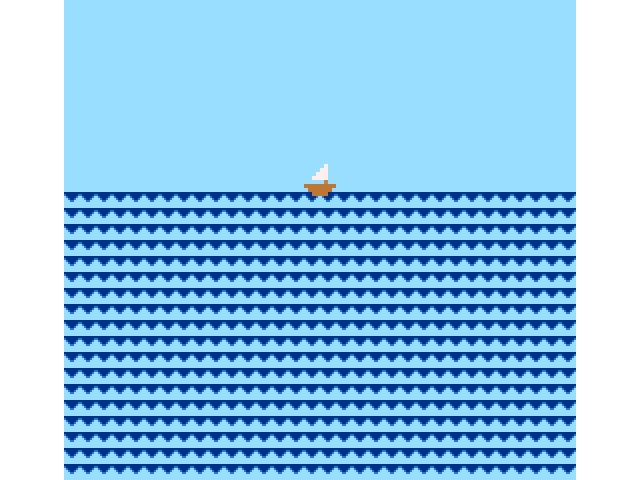
Line by line:
- 20 —
SCREEN 2. Every cell is tile 0. - 30 — reads 64 bytes of
DATAinto tiles 0 and 1: the wave at lines 200 and 210, and the sky, one color all over, at 220 and 230. - 40 — reads the boat's shape, lines 300 and 310, into sprite shape 0.
- 50 — puts tile 1 in the top twelve rows, 384 cells. Everything below stays tile 0, so it's sea without any drawing at all.
- 60 — makes colors 1, 2 and 3 of row 0 into a dark blue, a blue and a pale blue. The tiles use those three and nothing else.
- 70 — doubles the size of the sprites.
- 80 — puts the boat on the horizon, in row 14, the browns: its hull is color 7 and its sail is 15, the palest.
- 90 — waits for a key.
- 110–130 — once every picture, moves layer 0 one pixel further left, until another key.
The boat never moves. The sea goes past it, and that's enough to sail.
When it stops, the text screen comes back, with its own colors: the dark blue you made out of color 1 is black again.
Programs from before
Every keyword BASIC had before these arrived still has the same number inside a saved program, so a program saved on an older ACE loads and runs. Two things changed:
BRKis gone. Its number isSCREEN's now, so an old program that used it stops with?SYNTAX ERRORon that line.- A variable name can't start with a new keyword.
SCROLLX,LAYERSorNVSAVEDnow read as the keyword followed by something else, which is a?SYNTAX ERRORin a listing typed in. See listings from an older ACE.
Next: reading the joysticks and the keyboard while a program runs.