

The screen
The video card is a 6502-PICOVDP, and the machine uses it first as a text screen: 40 columns by 24 rows of 6 × 8 cells, each character with a color pair of its own, drawn in a character set the card carries itself. The screen comes up the first time anything is printed — BASIC's header, on a normal start — so by the time your program runs it is already there.
That is the part of the card this chapter covers. Underneath the text it has three more screen layouts, 256 colors, two layers and 64 sprites, and the graphics modes is where those start.
Text mode, as the machine leaves it
VideoClear | Fill the screen with spaces in the current pen, cursor to the top left |
VideoSetCursor | X = column 0–39, Y = row 0–23 |
VideoGetCursor | The same two, back out |
VideoPutChar | Put the character in A at the cursor, without moving it |
VideoChroutRaw | Put it there and advance, wrapping and scrolling as needed |
VideoScroll | Everything up one line |
VideoSetColor | The pen: letters and background, one nibble each — and the border |
InitVideo | Put the whole thing back to text mode, character set and colors included |
The difference between VideoPutChar and VideoChroutRaw is the one to keep straight. VideoPutChar stamps. VideoChroutRaw stamps and moves along — and unlike Chrout it does not interpret anything, so all 256 characters are available to it.
Drawing something
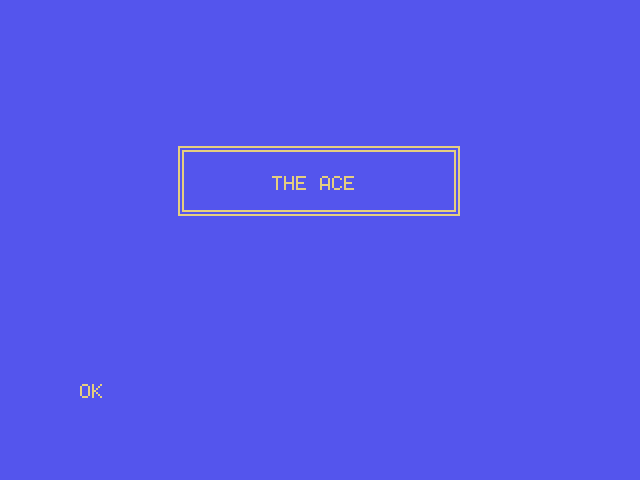
; Drawing on the screen directly — a framed sign, built out of the box-drawing
; characters the machine already has in its character set.
;
; Console output goes wherever the machine's console goes. This does not: it
; puts characters at chosen positions on the screen, which is how a game draws
; and how anything with a layout draws.

.setcpu "65C02"

.include "6502-VDP.inc"

.segment "CODE"

BasicStartup:
  .byte $0A, $08, $0A, $00, $A5, $32, $30, $36, $30, $00, $00, $00

BOX_LEFT  = 8                   ; column of the left-hand edge
BOX_TOP   = 6                   ; row of the top edge
BOX_WIDTH = 24                  ; including both edges

; The box-drawing corners and edges, by character code.
TOP_LEFT     = $C9
TOP_RIGHT    = $BB
BOTTOM_LEFT  = $C8
BOTTOM_RIGHT = $BC
ACROSS       = $CD
DOWN         = $BA

Left  := $40                    ; what DrawRow puts at each end and in between
Middle := $41
Right := $42
Row   := $43

Start:
  lda HW_PRESENT
  and #HW_VID                   ; no screen, nothing to draw on
  beq NoScreen

  lda #(TMS_LT_YELLOW * 16) | TMS_DK_BLUE
  jsr VideoSetColor             ; letters, then background
  jsr VideoClear                ; fills the screen with those colors

  lda #TOP_LEFT
  sta Left
  lda #ACROSS
  sta Middle
  lda #TOP_RIGHT
  sta Right
  lda #BOX_TOP
  sta Row
  jsr DrawRow

  lda #DOWN                     ; three hollow rows
  sta Left
  sta Right
  lda #' '
  sta Middle
  ldx #3
@sides:
  phx
  inc Row
  jsr DrawRow
  plx
  dex
  bne @sides

  lda #BOTTOM_LEFT
  sta Left
  lda #ACROSS
  sta Middle
  lda #BOTTOM_RIGHT
  sta Right
  inc Row
  jsr DrawRow

  ldx #16                       ; centered in the box
  ldy #BOX_TOP + 2
  jsr VideoSetCursor
  ldy #0
@title:
  lda Title,y
  beq Done
  jsr VideoChroutRaw            ; stamps the character and moves along
  iny
  bra @title

; Leave the cursor somewhere sensible. Whatever prints next — including
; BASIC's own prompt — carries on from wherever this program left it.
Done:
  ldx #0
  ldy #20
  jmp VideoSetCursor

NoScreen:
  lda #<NoScreenMsg
  ldy #>NoScreenMsg
  jsr PrintStr
  rts

; One row of the box: an edge, a run of middles, an edge.
DrawRow:
  ldx #BOX_LEFT
  ldy Row
  jsr VideoSetCursor
  lda Left
  jsr VideoChroutRaw
  ldx #BOX_WIDTH - 2
@across:
  lda Middle
  jsr VideoChroutRaw            ; keeps X and Y for us
  dex
  bne @across
  lda Right
  jmp VideoChroutRaw

Title:        .byte "THE ACE", $00
NoScreenMsg:  .byte "NO SCREEN TO DRAW ON", CHAR_CR, CHAR_LF, $00
╔══════════════════════╗
║ ║
║ THE ACE ║
║ ║
╚══════════════════════╝Three things in there are worth pulling out.
The check at the top. HW_PRESENT says what the machine found at power-on. Guarding a screenful of drawing with and #HW_VID costs four bytes and means the program says something sensible instead of drawing into a card that is not there. What's fitted is the whole chapter on this.
The pen. VideoSetColor takes the letter color in the high nibble and the background in the low one, so light yellow on dark blue is (TMS_LT_YELLOW * 16) | TMS_DK_BLUE. The names are all in 6502-VDP.inc. Setting the pen changes nothing already on the screen; it colors what is drawn next, and VideoClear fills the whole screen with it — which is why the program sets the pen first and clears second.
Leaving the cursor somewhere sensible. Whatever prints next carries on from wherever you left the cursor, including BASIC's own OK. Setting it to a sensible row before returning is the difference between a tidy screen and a prompt in the middle of your artwork.
A color for every character
Every cell on the screen keeps two things: the character, and the color pair it was drawn in. So a program can change the pen between one character and the next, and the screen fills up with as many colors as it likes:
; A color for every character, and a color that changes everywhere at once.
;
; The pen is the pair of colors the next character is drawn in. Change it
; between lines and each line keeps the colors it was printed with. The palette
; is what those color numbers mean, so changing one entry recolors every
; character drawn with it, on the spot.

.setcpu "65C02"

.include "6502-VDP.inc"

.segment "CODE"

BasicStartup:
  .byte $0A, $08, $0A, $00, $A5, $32, $30, $36, $30, $00, $00, $00

ORANGE_R  = $0F                 ; a palette entry is %0000RRRR ...
ORANGE_GB = $80                 ; ... then %GGGGBBBB

Color := $40

Start:
  jsr KernalVersion             ; A = major version
  cmp #2
  bcc NoCard                    ; before 2.0 there is no palette to change
  jsr VdpInfo                   ; carry set: no 6502-PICOVDP
  bcs NoCard

  lda #(TMS_WHITE << 4) | TMS_BLACK
  jsr VideoSetColor             ; white on black, and a black border
  jsr VideoClear                ; the whole screen in that pen

  lda #<Title
  ldy #>Title
  jsr PrintStr

  lda #TMS_MED_GREEN            ; every color from 2 to 15, on black
  sta Color
@line:
  lda Color
  asl a
  asl a
  asl a
  asl a                         ; the color as the foreground nibble
  ora #TMS_BLACK
  jsr VideoSetColor             ; only what prints from here on
  lda Color
  asl a
  tax
  lda Names,x
  ldy Names+1,x
  jsr PrintStr
  inc Color
  lda Color
  cmp #16
  bne @line

  lda #(TMS_WHITE << 4) | TMS_BLACK
  jsr VideoSetColor
  lda #<Change
  ldy #>Change
  jsr PrintStr
  jsr WaitKey

  ldx #TMS_MAGENTA              ; entry 13 becomes orange ...
  lda #ORANGE_R
  ldy #ORANGE_GB
  jsr VdpSetPalette             ; ... and so does every character drawn in it

  lda #<Restore
  ldy #>Restore
  jsr PrintStr
  jsr WaitKey

  jmp InitVideo                 ; row 0 of the palette back as it was

NoCard:
  lda #<NeedsCard
  ldy #>NeedsCard
  jmp PrintStr

; Wait for a key without printing it: Chrin would echo it to the screen.
WaitKey:
  jsr BufferSize                ; how many keys are waiting
  beq WaitKey
  jmp ReadBuffer                ; take one, and say nothing

Names:
  .word 0, 0
  .word MedGreen, LtGreen, DkBlue, LtBlue, DkRed, Cyan, MedRed, LtRed
  .word DkYellow, LtYellow, DkGreen, Magenta, Gray, White

Title:     .byte "EVERY LINE IN ITS OWN PEN", CHAR_CR, CHAR_LF, CHAR_CR, CHAR_LF, $00
MedGreen:  .byte " 2 MEDIUM GREEN", CHAR_CR, CHAR_LF, $00
LtGreen:   .byte " 3 LIGHT GREEN", CHAR_CR, CHAR_LF, $00
DkBlue:    .byte " 4 DARK BLUE", CHAR_CR, CHAR_LF, $00
LtBlue:    .byte " 5 LIGHT BLUE", CHAR_CR, CHAR_LF, $00
DkRed:     .byte " 6 DARK RED", CHAR_CR, CHAR_LF, $00
Cyan:      .byte " 7 CYAN", CHAR_CR, CHAR_LF, $00
MedRed:    .byte " 8 MEDIUM RED", CHAR_CR, CHAR_LF, $00
LtRed:     .byte " 9 LIGHT RED", CHAR_CR, CHAR_LF, $00
DkYellow:  .byte "10 DARK YELLOW", CHAR_CR, CHAR_LF, $00
LtYellow:  .byte "11 LIGHT YELLOW", CHAR_CR, CHAR_LF, $00
DkGreen:   .byte "12 DARK GREEN", CHAR_CR, CHAR_LF, $00
Magenta:   .byte "13 MAGENTA", CHAR_CR, CHAR_LF, $00
Gray:      .byte "14 GRAY", CHAR_CR, CHAR_LF, $00
White:     .byte "15 WHITE", CHAR_CR, CHAR_LF, $00
Change:    .byte CHAR_CR, CHAR_LF, "PRESS A KEY TO CHANGE COLOR 13", CHAR_CR, CHAR_LF, $00
Restore:   .byte "PRESS A KEY TO PUT IT BACK", CHAR_CR, CHAR_LF, $00
NeedsCard: .byte "NEEDS BIOS 2 AND A 6502-PICOVDP", CHAR_CR, CHAR_LF, $00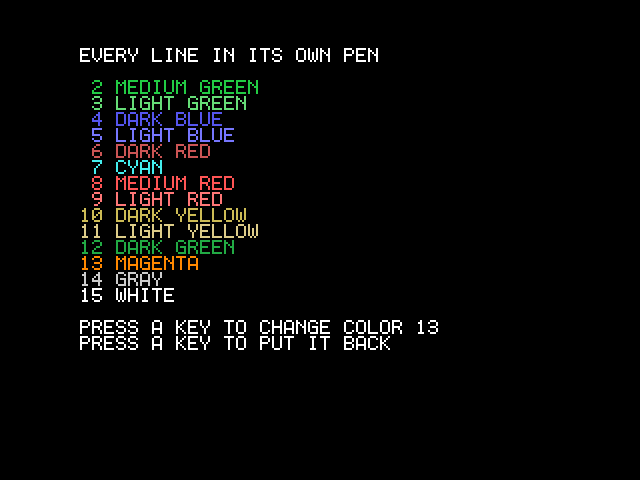
The border follows the pen. The strip around the text takes the background nibble of the last VideoSetColor, so a program that sets white on black gets a black frame to go with it. The card's register 7 cannot be read back, so the Kernal keeps the border in VID_BORDER — which is how the border you asked for is still there after a program has been off in another screen layout and come back, and why a screen brought up by a COLOR with a border of its own comes up in that border rather than flashing the old one first.
A color number is a palette entry. The card doesn't store "magenta" in a cell; it stores 13, and looks 13 up in its palette every time it draws a line. VdpSetPalette rewrites an entry — X is the entry, A and Y the red, then the green and blue, four bits each — and everything drawn with that number changes on the next line the card draws. That is what the program does to line 13.
InitVideo puts the colors back. It restores the first sixteen palette entries, and the border from VID_BORDER, along with everything else about text mode — but it doesn't clear the screen, so the program's last instruction returns the orange line to magenta without losing a character.
The colors
These are the first sixteen of the card's 256, the ones text mode uses and the ones the TMS_* names in the include refer to. Color 0 is the one to be careful with: text mode draws it as black, but in a graphics layer it is usually transparent, letting whatever is behind show through.
| # | Name | Constant | |
|---|---|---|---|
0 | Transparent | TMS_TRANSPARENT | |
1 | Black | TMS_BLACK | |
2 | Medium green | TMS_MED_GREEN | |
3 | Light green | TMS_LT_GREEN | |
4 | Dark blue | TMS_DK_BLUE | |
5 | Light blue | TMS_LT_BLUE | |
6 | Dark red | TMS_DK_RED | |
7 | Cyan | TMS_CYAN | |
8 | Medium red | TMS_MED_RED | |
9 | Light red | TMS_LT_RED | |
10 | Dark yellow | TMS_DK_YELLOW | |
11 | Light yellow | TMS_LT_YELLOW | |
12 | Dark green | TMS_DK_GREEN | |
13 | Magenta | TMS_MAGENTA | |
14 | Gray | TMS_GRAY | |
15 | White | TMS_WHITE |
0 and 1 look the same — text mode draws color 0 as black. In a graphics layer, 0 is usually transparent instead.
The character set
The 256 glyphs are the IBM code page 437 set: letters, digits, punctuation, box drawing, blocks, arrows, card suits, a handful of Greek. They are not in the ROM. The card carries them in its firmware and copies them into its own memory, at $0800 of the card's 64 KB, and text mode draws from that copy: eight bytes per character, one byte per row, most significant bit on the left, and the top six bits of each byte inside the 6 × 8 cell.
Which means you can change the character set — the classic text-mode trick. Rewrite the eight bytes of a character you never use, and every place that character appears on screen becomes your shape. VdpPoke writes one byte of the card's memory, X and Y the address:
PATTERNS = $0800                ; where text mode keeps the glyphs, in the card

  ldy #0
Copy:
  phy
  tya
  clc
  adc #<(PATTERNS + '*' * 8)    ; the eight bytes that draw a '*'
  tax
  lda MyShape,y
  ldy #>(PATTERNS + '*' * 8)
  jsr VdpPoke
  ply
  iny
  cpy #8
  bne Copy

MyShape:
  .byte %01111000
  .byte %11111100
  .byte %10110100
  .byte %11111100
  .byte %10000100
  .byte %11001100
  .byte %01111000
  .byte %00000000
Draw the shape in the source and you can see it while you type it — six pixels wide, with the two low bits of every byte left clear.
Put it back when you're done
InitVideo has the card copy its own set in again and restores text mode, which makes it the one-line undo for any amount of character-set vandalism. BASIC doesn't call it for you when your program returns, so call it before you do, or the OK prompt will be written in your shapes.
How the screen scrolls
When the cursor runs off the bottom row, nothing is copied. The card can scroll its picture in hardware, so the Kernal moves the whole text layer up by eight pixels — one register write — and clears the row that comes into view at the bottom. That makes a scroll a few hundred cycles instead of the tens of thousands a copy would cost.
The catch is only for a program that writes the card's memory directly. The top row of the screen is not always the top row of the table behind it: VID_TOP ($0392) says which table row is showing at the top, so the cell at a screen position is at
((row + VID_TOP) mod 24) × 40 + columnThe Kernal's own calls already account for it — VideoSetCursor and VideoGetCursor speak screen rows — so a program that draws through them never needs to know.
Talking to the card directly
The card has two complete pairs of addresses:
| Data | Command and status | |
|---|---|---|
| Port A | VC_DATA $9C00 | VC_REG / VC_STATUS $9C01 |
| Port B | VC_DATA2 $9C02 | VC_REG2 / VC_STATUS2 $9C03 |
Each pair has its own pointer into the card's memory, and the Kernal and BASIC only ever use port A. Everything is two writes to the command address — a byte, then a command:
| Second write | Does |
|---|---|
%1rrrrrrr — VC_REG_WRITE + register | Writes the first byte into register r, 0–127 |
%01aaaaaa — VC_ADDR_WRITE + address high bits | Points the port at an address, for writing |
%00aaaaaa | Points it at an address, for reading |
SetReg:                         ; A = value, X = register (VC_REG_*)
  sta VC_REG
  txa
  ora #VC_REG_WRITE
  sta VC_REG
  rts
After an address, every read or write of the data port moves on by one. The command carries only fourteen bits of address, so the top two — for anything at $4000 or above — come from the VBANK register, which you set first.
Two registers belong to both ports
VBANK and VINC (the step the pointer moves by) are shared between the ports, and every Kernal routine expects them at 0 and +1. A program that changes either puts it back before it prints anything, or calls InitVideo, which does.
The two pairs exist so that an interrupt handler never has to fight the foreground. A handler that uses port B cannot land between the two writes of a command on port A, so no sei and cli are needed around video work. Interrupts has a handler that does it.
Reading a status address returns one of sixteen status registers, chosen by STATSEL_A or STATSEL_B; the Kernal's VdpStatus reads one for you. A read also resets that port's first-write-or-second flag, which is the way to get back in step if you are ever unsure.
Next: the graphics modes.